Vibe boldly. Verify everything.
AI-assisted scientific computing with you in the loop
Vaibify is a browser-based application for developing, running, and verifying scientific workflows. Work with coding agents in secure Docker containers, visually inspect figures and data, verify your pipeline steps are accurate, and enable others to reproduce your results at the byte level.
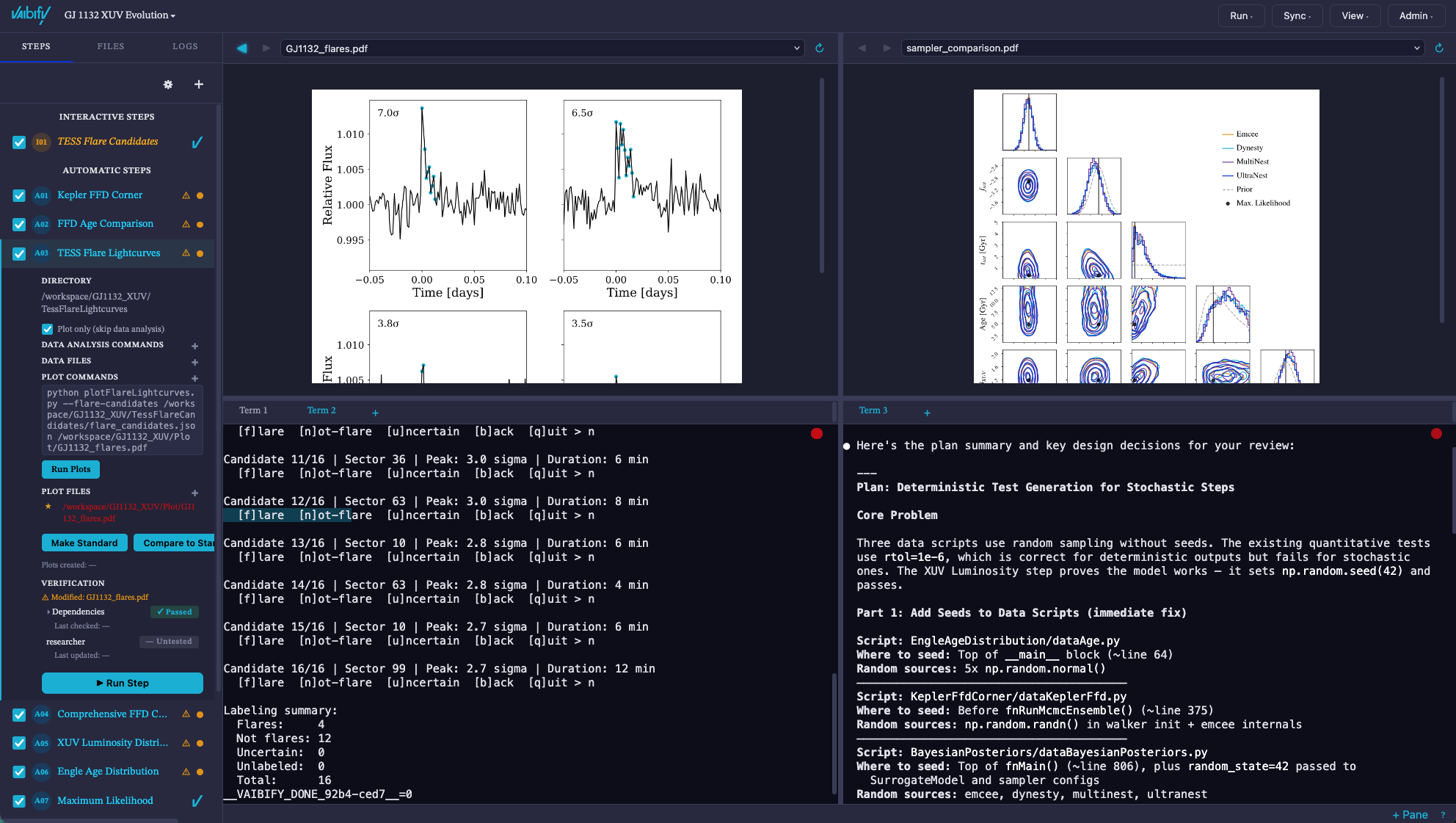
The dashboard shows the up-to-date status of a research project in the secured computing environment. The selected step has passing dependencies and pending researcher approval. Verification is still in progress. View full-resolution image
- Left Workflow & verification
- Inspect each pipeline step’s commands, files, dependencies, and unit tests. When you are satisfied, approve it.
- Upper right Figures & data
- Examine outputs side by side and compare figures with saved standards.
- Lower right Terminals & agents
- Run commands, make interactive decisions, and work with an AI coding agent.
Working with Vaibify
From an exploratory analysis to a verified workflow
Start in a sandbox, develop a reusable toolkit, or organize an investigation as a Project with explicit steps and dependencies.
Dashboard reference- Run coding agents
- Use Claude Code, Codex, or Gemini in the dashboard’s terminals. Docker provides a secure environment for the project’s code, dependencies, and agent sessions.
- Define the analysis
- Combine automatic and interactive steps. Each step records its input data, analysis commands, output files, plot commands, and dependencies on other steps.
- Inspect and test outputs
- View figures and text files alongside the terminal. Compare plots with saved standards and run integrity, qualitative, and quantitative tests. Researcher approval is recorded separately.
- Track what changed
- Vaibify monitors the workflow’s files and declared dependencies. When an input or script changes, the dashboard identifies stale results and affected downstream steps that need attention.
- Check published copies
- Compare local files with their GitHub and Zenodo copies using SHA-256 hashes. Optional Overleaf and arXiv checks help track whether manuscript figures match the local results.
Scientific motivation
Keep your computer safe while you verify the AI’s work
Docker containers give coding agents a dedicated environment for the project’s code and dependencies. Within that environment, establishing that an analysis is meaningful still requires inspecting the data, testing the calculations, and understanding the assumptions. An agent can also revise a script after its outputs have been reviewed, leaving earlier figures and conclusions out of date.
Vaibify brings the code’s execution, its outputs, and their verification status into the same view. Explicit dependencies and recorded checks help researchers see what needs to be examined again, while archived files and a pinned environment provide a basis for reproducing the computation.
Reproducing a computation does not establish that its scientific interpretation is correct. That judgment remains with the researcher.
Read the design philosophyReproducibility
The PROOF ladder
The PROOF tab lists the evidence required for each level and shows which requirements a project has met.
Provenance, Reproducibility, Openness, Oversight, Falsifiability.
Reproducibility reference| Level | Evidence checked |
|---|---|
| 1 Self-consistent | Declared inputs, current outputs, passing tests, researcher approval, and satisfied dependencies. |
| 2 Published | Matching copies on GitHub and Zenodo, together with declarations of AI use. |
| 3 Reproducible | A pinned container environment, a manifest of the project’s artifacts, and a recorded rerun whose output hashes match the manifest. |
Each level includes the requirements of the preceding levels. The full framework has six levels; Vaibify currently implements the first three. Read the framework
Using the software
Install Vaibify
Python 3.9 or later, on macOS or Linux.
pip install vaibify
vaibify
The application opens locally in your browser. You can work on your own machine, or use Docker for container isolation and Level 3 reproducibility.
Follow the Quickstart guide for setup and a first reproduction. The documentation covers environments, workflows, verification, and external services.